How much time do lawyers spend on email?
A legal software company says lawyers spend 66% of their day on email, but it has not shown how it measured that. You can measure your own email time in one week.
We could not find a careful, published measure of how much time lawyers spend on email. The number you see most often, 66% of the workday, comes from Dashboard Legal, a company that built email software for lawyers. It has not published how it measured that.
Here is the short version of the numbers we could trace to their source:
- Dashboard Legal, an email software company: lawyers spend 66% of their day on email.
- Bloomberg Law's 2024 survey of 1,054 legal professionals: 73% did some work on at least half of their days off. Of those, 77% did it to respond to emails, calls and other messages.
- Microsoft, for office workers in general, not only lawyers: the average worker receives 117 emails a day.
We have built Roar, a dictation app for Mac. There's a link to try Roar for free at the end of this article.
Do lawyers really spend 66% of their day on email?
We can't confirm it. The 66% figure was reported by Artificial Lawyer, a legal technology news site, in January 2022. The article says the number comes from Dashboard Legal's own research, and that the company gathered feedback from 2,500 lawyers.
The article doesn't say how the time was measured, or whether the 66% comes from those 2,500 lawyers. Dashboard Legal also sold a product to fix the problem it measured. That doesn't make the number wrong, but it is a company's claim, not an independent study.
How many emails does a lawyer get a day?
We could not find a published survey that counts lawyers' emails. The closest number is for office workers in general.
Microsoft looked at the use of its Microsoft 365 apps up to February 2025. It found that the average worker receives 117 emails a day, and skims most of them in under a minute. That figure covers all kinds of office workers, not only lawyers.
Lawyers' own reports vary. In a Reddit thread on billing for emails, one commenter says a lawyer at their firm easily gets 100 emails on an average day. That is one person's report, not a survey.
How many hours do lawyers work and bill a week?
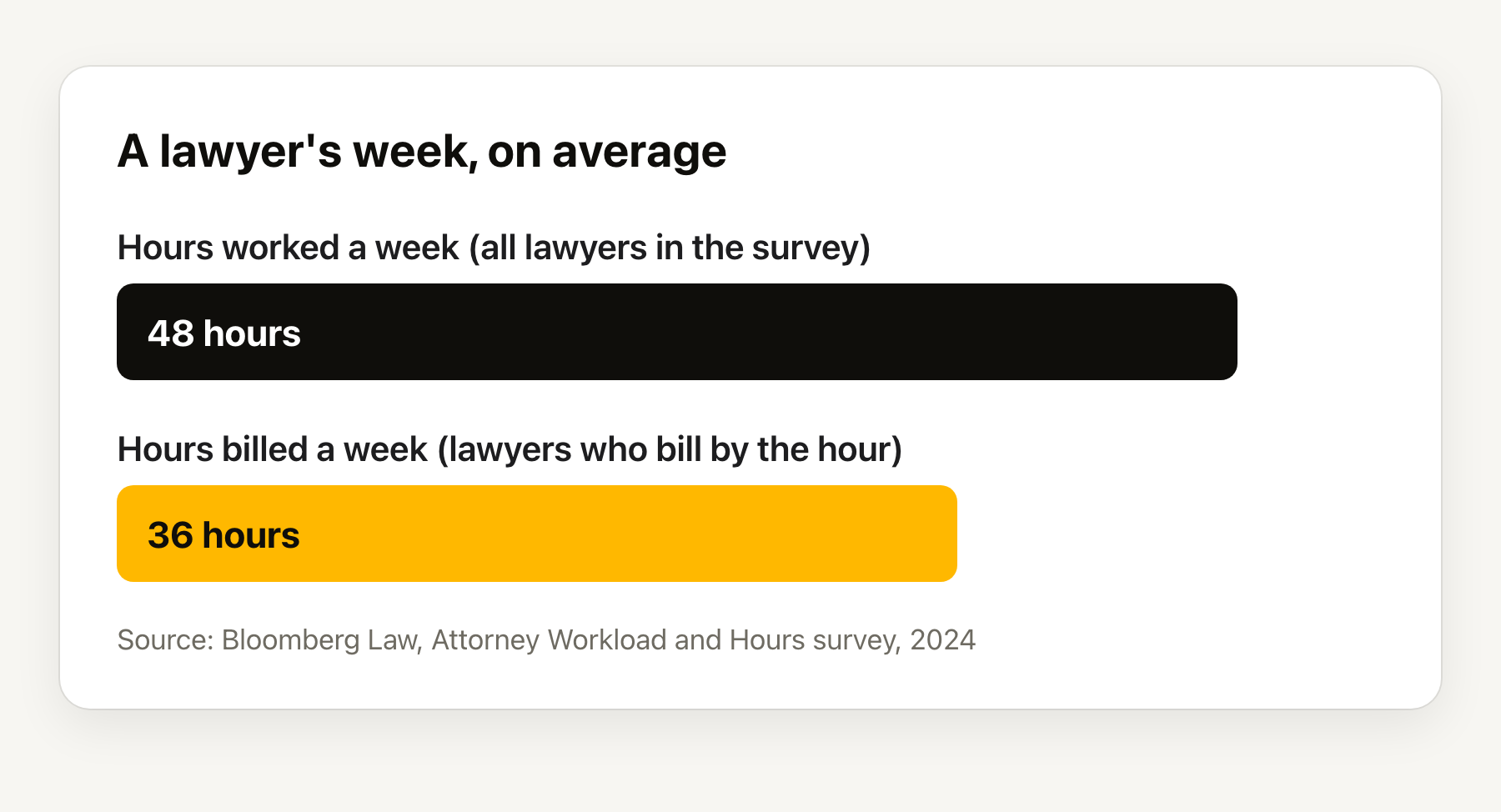
In Bloomberg Law's survey, lawyers said they worked 48 hours a week on average in the first half of 2024. The lawyers who bill by the hour said they billed 36 hours a week.
The two numbers come from different groups. Every lawyer in the survey answered the question on hours worked. Only the 58% who bill by the hour answered the question on hours billed.
The survey doesn't measure email on its own. It says lawyers spent 2 out of every 8 hours on administrative tasks, like tracking hours or managing projects. It doesn't say how much of that time was email.
For how lawyers count billable time, and how much of an average day gets billed, read our billable hours guide.
Do lawyers answer email on vacation?
Most of them do, according to Bloomberg Law's 2024 survey. The lawyers in it took 9 days off to relax in 2024, on average. Only 3% did nothing for work on those days.
- 73% did some work on at least half of their days off.
- Of the lawyers who worked on days off, 77% said they did it to respond to emails, calls and other messages.
Responding to messages was the most common reason in the survey, ahead of time-sensitive decisions (55%) and supporting clients (54%).
Can lawyers bill for time spent on email?
Yes, if the email is work on a client's matter, and your engagement letter allows hourly billing. Emails about the matter are billable work. General email, like firm news or marketing, is not.
Bill the time the email actually took. The National Association of Legal Assistants (NALA) gives an example: four short emails billed at the minimum 0.1 hours each charge 24 minutes. NALA's better entry bills the same emails as one entry of 0.2, or 12 minutes. Its advice is to combine short emails on one subject into one entry, with the real time.
Our billing narrative examples show how to describe an email exchange in a time entry. Our page of paralegal billing entries has NALA's full example.
How can I measure how much time I spend on email?
Keep a simple log for one work week. Write down when you open your email and when you close it, and what kind of email it was.
Time needed About 5 minutes a day for one week.
- Each time you start reading or writing email, write the start time.
- When you stop, write the end time.
- Mark the block as client work (with the matter) or other email.
- At the end of the day, add up each kind.
- At the end of the week, compare the total with your hours worked.
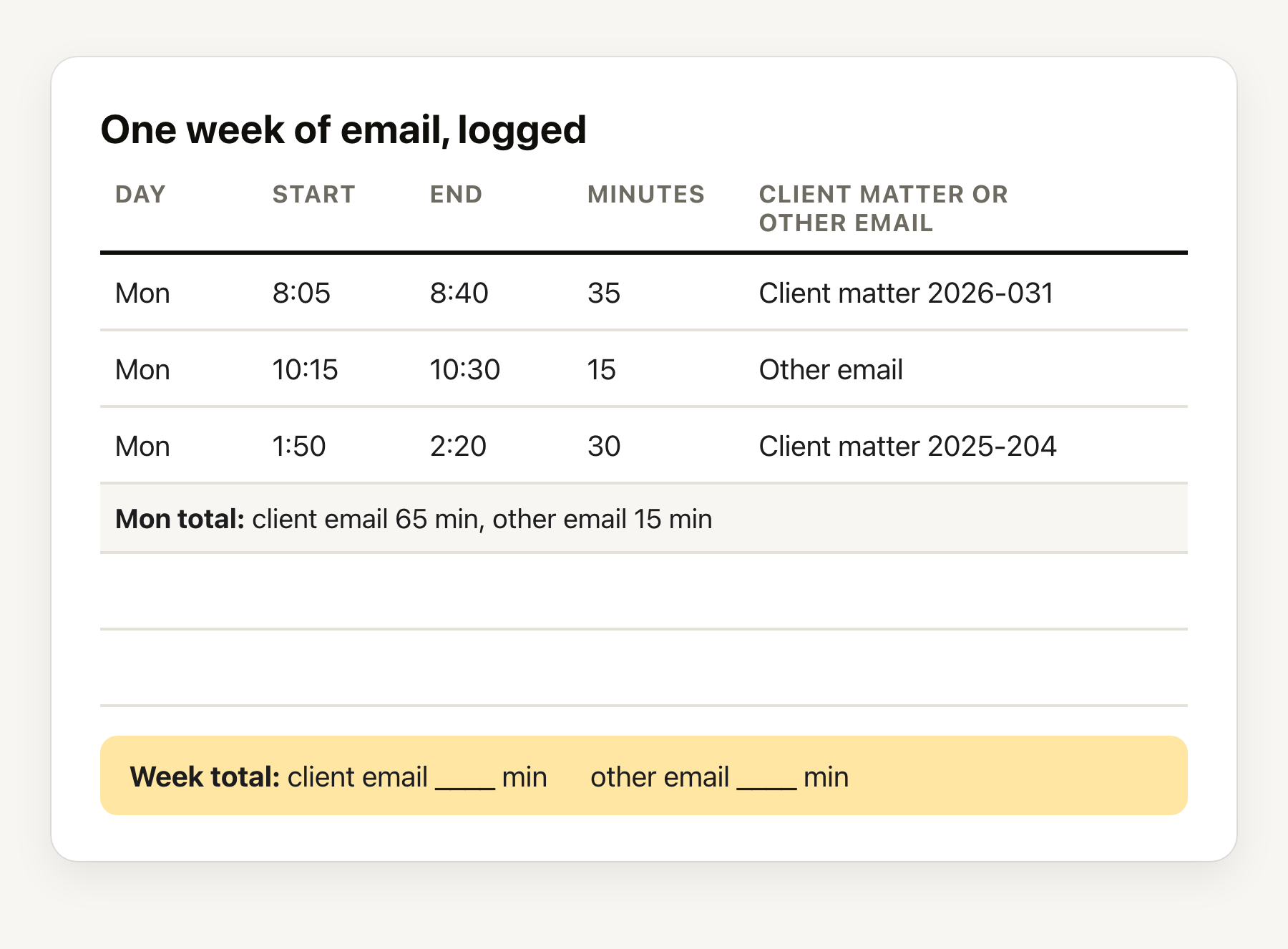
If your firm uses time-tracking software, its timer can do the counting. Start it when you open your email, and stop it when you close it.
The client-work column tells you something useful. Each block there is time that belongs on a time entry. If it's not in your time entries, you did the work and didn't bill it.
How can lawyers spend less time on email and bill more of it?
Write the time entry while you still remember the work, and spend fewer minutes on each email. Two habits help.
First, write the time entry as soon as you send the email. NALA's advice is to capture time as the work happens, because time rebuilt from memory later is often lost or wrong.
Second, say long replies out loud instead of typing them. Your Mac has free dictation built in, called Apple Dictation. Click in the email, press the Microphone key, and talk. On most Mac keyboards from the last few years, the F5 key has a small microphone on it. This is the Microphone key. Read the email before you send it, and check names and dates.
Our guides on dictating in Word and Outlook on a Mac and voice to text in Gmail on a Mac show the steps for each app.
When should a lawyer pay for a dictation app?
For simple, short text, like a text message, a web search or a quick reply, Apple Dictation works fine in most cases.
A paid app makes sense if you write for hours every day, and if you don't want to fix the dictation errors that Apple Dictation makes.
We've built Roar, the best way to write with your voice. Roar cleans up and formats text based on where you're writing to retain your exact meaning. Think of how emails, LinkedIn posts and AI prompts all need to be formatted differently. It keeps your exact words, to the best extent possible.
Roar types into Microsoft Outlook, Gmail, Microsoft Word and Clio, so you can say an email reply and its time entry as soon as you finish the work.
Roar keeps no recordings of your voice and no transcripts on our servers. It does not use your data to train AI models. Roar works on Macs with macOS 14 Sonoma or later and Apple silicon (M1 or newer).
Your first 5 dictations on Roar are free. You can read how Roar works for lawyers or download Roar for Mac.