What is the average typing speed?
The average person types about 52 words a minute on a computer keyboard and 36 on a phone. In a large study, 8 in 10 people typed between 26 and 78 words a minute.
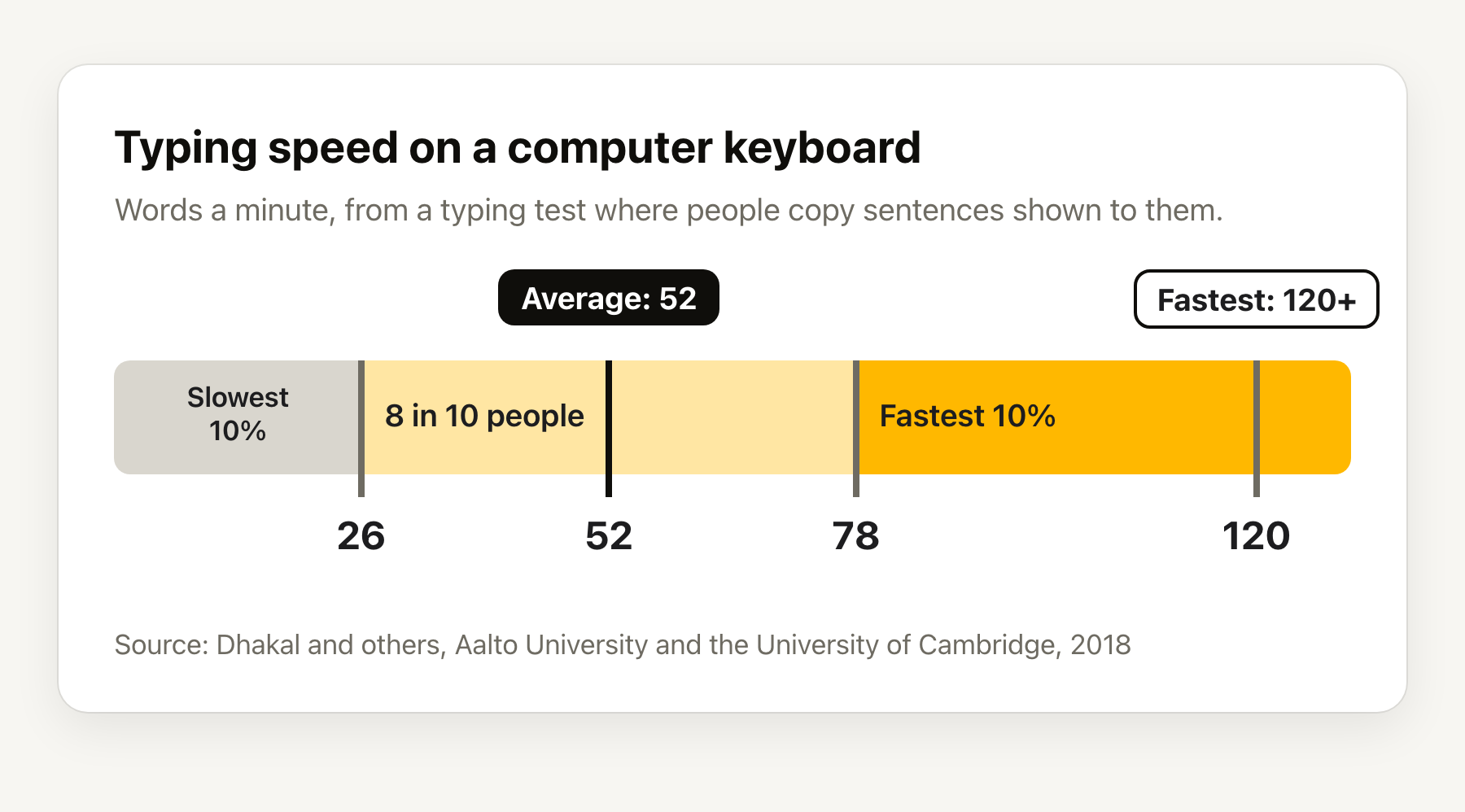
The average person types about 52 words a minute on a computer keyboard. In a large study, 8 in 10 people typed between 26 and 78 words a minute. The fastest typists reach 120 or more.
We have built Roar, a dictation app that is light years ahead of Apple Dictation. There's a link to try Roar for free at the end of this article.
What is the average typing speed?
The average typing speed on a computer keyboard is 52 words a minute. This number comes from a large typing study.
In 2018, researchers at Aalto University in Finland and the University of Cambridge recorded almost 169,000 people taking an online typing test. Each person copied 15 English sentences, one at a time, as fast and as correctly as they could. The average speed was 51.56 words a minute.
How is typing speed measured?
Typing speed is measured in words a minute, where a word is any 5 characters, spaces included. So 52 words a minute means 260 characters a minute, whatever the length of the real words.
The people in the study were not a random group. They came to the test from a typing website, so most of them were interested in their typing. Their average age was about 25, and 68 percent of them were from the US. About 7 in 10 had taken a typing course.
What is a good typing speed?
Anything over 52 words a minute is faster than average. Over 78 words a minute puts you in the fastest 10 percent of the people in the study.
| Typing speed | Compared with the people in the study |
|---|---|
| Under 26 words a minute | The slowest 10 percent |
| 26 to 51 words a minute | Below average |
| 52 words a minute | Average |
| 53 to 78 words a minute | Above average |
| Over 78 words a minute | The fastest 10 percent |
| 120 words a minute or more | The fastest typists in the study |
For comparison, studies of professional typists, mostly from the 1930s to the 1980s, measured about 60 to 75 words a minute.
Is 24 WPM slow?
Yes. 24 words a minute is slower than about 9 in 10 people in the study. The slowest 10 percent typed under about 26 words a minute.
In the study, people who typed with more fingers were faster. People who had taken a typing course were, on average, 5 words a minute faster than people who had not.
Is 75 WPM impressive?
Yes. 75 words a minute is much faster than the average of 52. It is close to the fastest 10 percent, who typed over about 78 words a minute.
What is the top 1% of typing speed?
The study doesn't give a number for the top 1 percent. It says the fastest typists reached 120 words a minute or more. The fastest 10 percent started at about 78 words a minute.
What is the average typing speed by age?
The study didn't publish typing speed by age. Most of its volunteers were young: 3 in 4 were between 11 and 30 years old. So the average of 52 words a minute is mostly the speed of teenagers and young adults.
A second study by the same researchers looked at typing on phones. There, people aged 10 to 19 typed the fastest.
What is the average typing speed on a phone?
The average typing speed on a phone is about 36 words a minute. This comes from a 2019 study of 37,370 people who took a typing test on their phones.
More than 74 percent of them typed with both thumbs. Typing with two thumbs was faster than typing with one thumb or one finger.
How many mistakes does the average typist make?
The average typist in the study left about 1 wrong character in every 100. These are the mistakes still there at the end, after people had fixed what they noticed. In general, faster typists made fewer mistakes.
How can I write faster than I type?
Speak instead of typing. Speaking is almost three times as fast as typing.
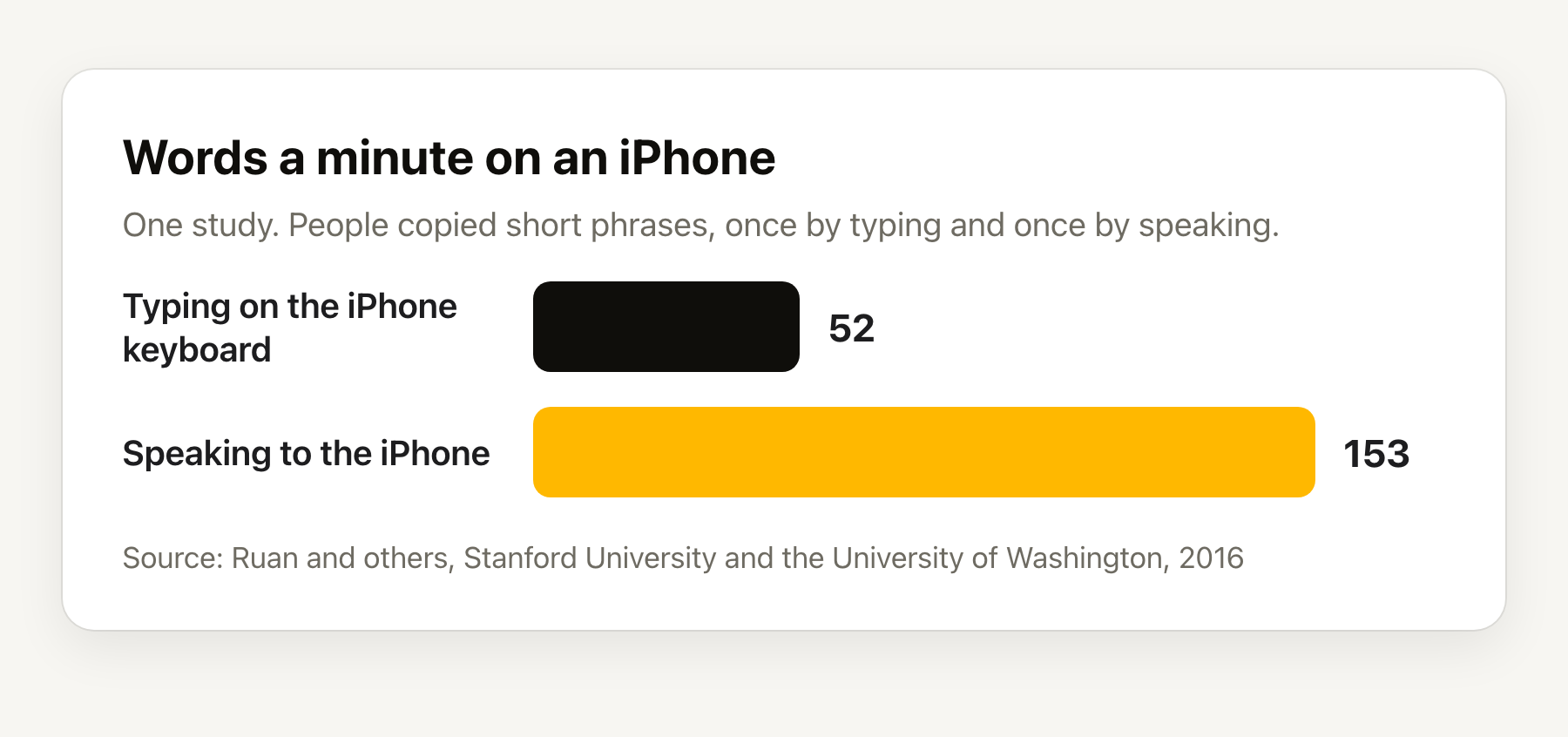
A study at Stanford University and the University of Washington compared the two on an iPhone. People copied short phrases, once by speaking and once by typing on the phone's keyboard. Speaking reached 153 words a minute. The keyboard reached 52.
The people in this lab study typed faster on the phone than the 36 average above, and speaking was still almost three times as fast.
Your Mac has free dictation built in. Apple calls it Dictation. Open System Settings, click Keyboard, and turn on Dictation. Then press the Microphone key and talk. Our guide on how to dictate on a Mac shows every step with pictures.
To see what these speeds mean for a real piece of writing, read our guide on how long it takes to type 1,000 words.
When should you pay for a dictation app?
For simple, short text, like a text message, a web search or a quick reply, Apple Dictation works fine in most cases.
A paid app makes sense if you write for hours every day, and if you don't want to fix the dictation errors that Apple Dictation makes.
We've built Roar, the best way to write with your voice. Roar cleans up and formats text based on where you're writing to retain your exact meaning. Think of how emails, LinkedIn posts and AI prompts all need to be formatted differently. It keeps your exact words, to the best extent possible.
Roar keeps no recordings of your voice and no transcripts on our servers. It does not use your data to train AI models. Roar works on Macs with macOS 14 Sonoma or later and Apple silicon (M1 or newer).
Your first 5 dictations on Roar are free. You can read how Roar works or download Roar for Mac.