How long does it take to transcribe 1 hour of audio?
Typing out 1 hour of audio by hand takes about 4 hours, or 8 to 10 with checking and editing. These figures come from university libraries and oral history programs.
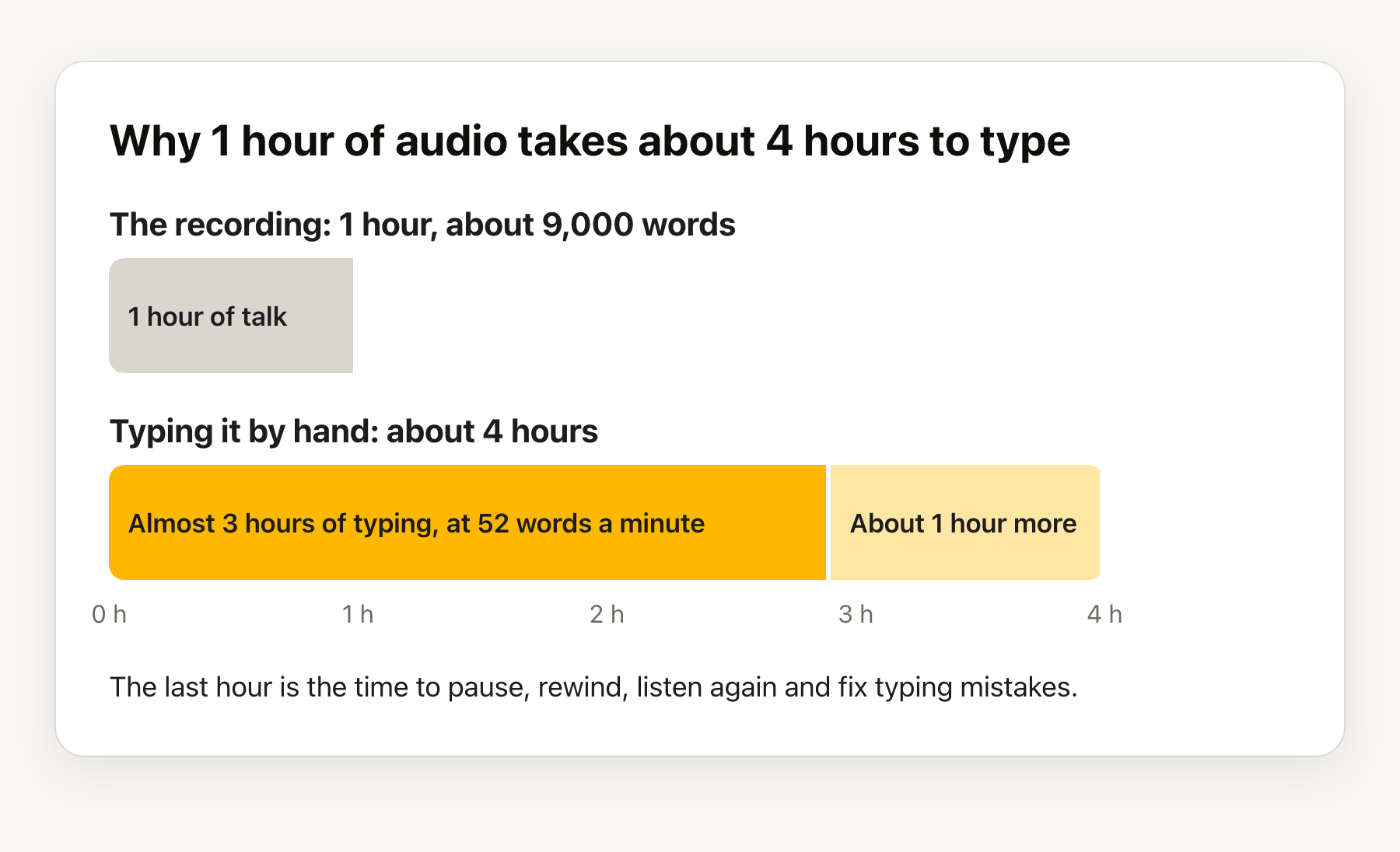
It takes about 4 hours to type out 1 hour of clear audio by hand. If you also check every word against the recording and tidy the text, it can take 8 to 10 hours.
These times assume clear audio and a person who types at an average speed. Noisy audio, more speakers and hard words all make it take longer.
We have built Roar, a dictation app that is light years ahead of Apple Dictation. There's a link to try Roar for free at the end of this article.
How long does it take to transcribe 1 hour of audio?
Several universities and oral history programs plan for about 4 hours of typing for every hour of audio. Some plan for much more, because they count the time to check and edit the text too.
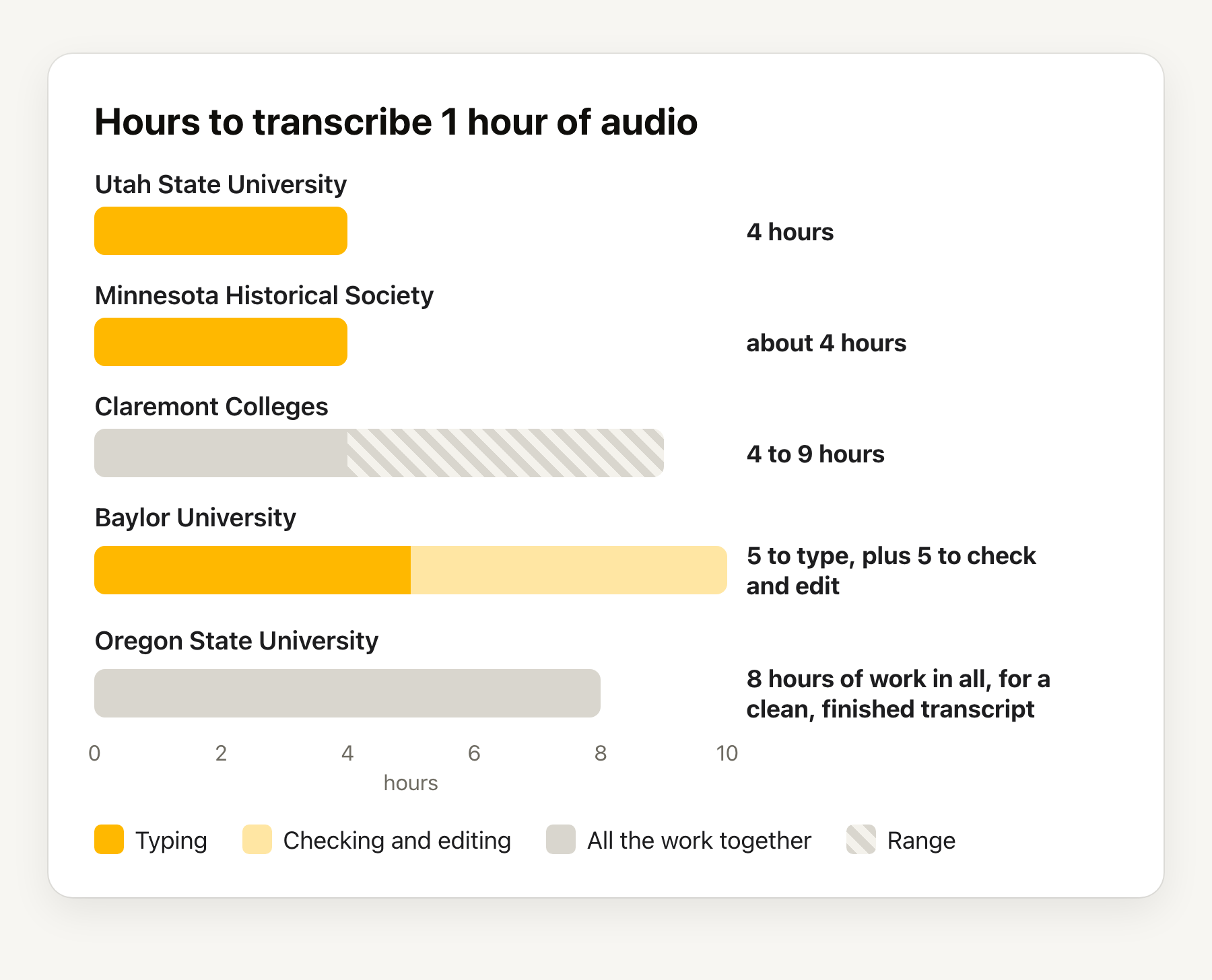
The table shows each source and its figure.
| Source | Time for 1 hour of audio |
|---|---|
| Utah State University Libraries | 4 hours |
| Minnesota Historical Society | About 4 hours (1 hour for every 15 minutes of audio) |
| Claremont Colleges Library | 4 to 9 hours |
| Baylor University Institute for Oral History | 5 hours to type, then 2 hours to check and 3 hours to edit |
| Oregon State University Libraries | 8 hours of work for a clean, finished transcript |
Why does it take 4 hours to transcribe 1 hour of audio?
It takes 4 hours because people talk about three times faster than most people type, and you keep stopping to rewind.
- People talk at about 150 words a minute. One hour of steady talk is about 9,000 words.
- The average person types about 52 words a minute.
- Typing 9,000 words at that speed takes almost 3 hours, without a single pause.
- Then add the time to pause the recording, rewind, listen again, and fix your typing mistakes. That brings it to about 4 hours.
The typing speed of 52 words a minute comes from a typing test, where you copy sentences shown to you. Typing what you hear is usually slower than a typing test, because you have to listen, remember and type at the same time.
How long does it take to transcribe 30 minutes of audio?
It takes about 2 hours to type out 30 minutes of clear audio by hand. That is the same rule: about 4 minutes of typing for every minute of audio.
| Length of the audio | Time to type it by hand | Time with checking and editing |
|---|---|---|
| 1 minute | About 4 minutes | 8 to 10 minutes |
| 10 minutes | About 40 minutes | 80 to 100 minutes |
| 30 minutes | About 2 hours | 4 to 5 hours |
| 1 hour | About 4 hours | 8 to 10 hours |
The time to type by hand uses the 4-to-1 figure from Utah State University and the Minnesota Historical Society. The time with checking and editing uses Oregon State's 8 hours and Baylor's 10 hours (5 to type, 2 to check, 3 to edit).
How long does it take to transcribe a 1 hour interview?
It takes about 4 hours to type out a 1 hour interview by hand. But a journalist rarely needs every word of an interview.
A news story uses a few quotes. If you keep a note of the minute of each line you may want to quote, you only need to type those lines. That can take minutes instead of hours.
Our guide on how journalists transcribe interviews shows how to keep that note while you talk, and how to check each quote against the recording.
Type the whole interview only when you need all of it, such as for a question-and-answer piece that is published in full.
What makes transcription take longer?
Transcription takes longer when the audio is hard to hear, when more people speak, and when the subject has words you don't know. The Claremont Colleges Library names these three as the reasons its estimate runs from 4 to 9 hours.
- Audio quality. Noise, wind, a phone line or a quiet speaker make you rewind more often.
- More speakers. People talk over each other, and you have to note who said what.
- The subject. Names, places and technical words take time to look up and spell right.
It also takes longer if you want every word exactly as spoken, with every "um" and false start. Decide before you start whether you need that, or only a clean version of what was said.
Utah State University also suggests working in short sessions. Typing a long recording in one go makes you tired, and tired typists make more mistakes.
How much time does a transcription tool save?
A transcription tool does the typing for you, so the hours of typing go away. What stays is the time to check the text against the recording.
The Center for News, Technology and Innovation studied AI transcription in journalism in 2025. It found that these tools can save time compared with typing by hand, even when a person reviews the result. It also found two problems a journalist should know about:
- The tools sometimes add words the person never said. This happens more often when there are long pauses in the speech.
- They work best for a narrow range of standard American English accents, and less well for other ways of speaking English.
So a tool changes the work from typing every word to checking the words that matter. For a journalist, that means every quote, name and number you use. Play each one back from the recording before it goes in your story.
Can I transcribe 1 hour of audio to text for free?
Yes. On a Mac, the Voice Memos app can show a transcript of a recording for free. It works on Macs with Apple silicon and macOS Sequoia or later. Click the recording, then click the Transcription button.
Apple says audio transcription in Voice Memos isn't available in all countries or regions. Our guide on how to turn voice memos into text on a Mac shows every step, with pictures, and what to do if you don't see the button.
You still need to check the transcript against the recording before you quote from it.
When should a journalist pay for a dictation app?
For simple, short text, like a text message, a web search or a quick reply, Apple Dictation works fine in most cases.
A paid app makes sense if you write for hours every day, and if you don't want to fix the dictation errors that Apple Dictation makes.
We've built Roar, the best way to write with your voice. Roar cleans up and formats text based on where you're writing to retain your exact meaning. Think of how emails, LinkedIn posts and AI prompts all need to be formatted differently. It keeps your exact words, to the best extent possible.
Roar keeps no recordings of your voice and no transcripts on our servers. It does not use your data to train AI models. Roar works on Macs with macOS 14 Sonoma or later and Apple silicon (M1 or newer).
On every paid plan, Roar can also turn a recording you already have, like a voice memo or a phone recording, into text in a note on your Mac.
Your first 5 dictations on Roar are free. You can read how Roar works for journalists or download Roar for Mac.