Is Wispr Flow private?
Wispr Flow turns your voice into text in its cloud. By default it can store your audio and transcripts and use them to train its models. You can switch both off.
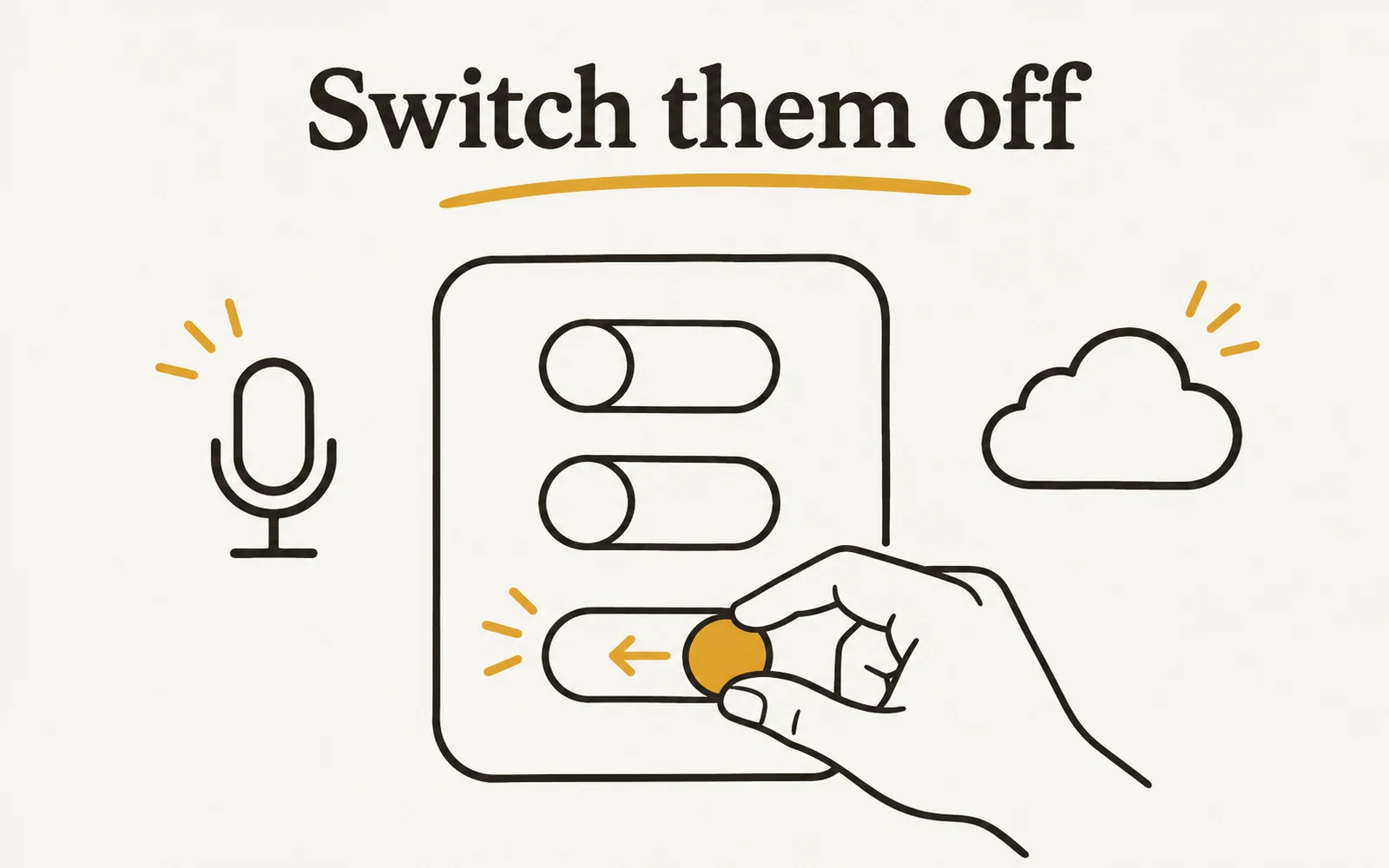
Wispr Flow is only as private as your settings. It turns your speech into text in its cloud. Out of the box, it can keep your audio and transcripts on its servers, use them to improve its models, and read the text on your screen while you dictate. You can switch all three off in Settings, Data and Privacy.
What data does Wispr Flow collect?
Wispr Flow collects your audio, the transcript made from it, the app you dictated in, and, with Context awareness on, text from your screen. Wispr Flow says transcription always happens in the cloud.
Some of it goes to Wispr whatever your settings. Wispr Flow always uses the name of the app you are dictating in to format your text, whatever your data settings. Even with model training off, Wispr Flow still uploads details such as the word count, the length of each dictation, the app and the time.
What it keeps after that depends on three switches. The next sections take them one at a time.
Does Wispr Flow take screenshots?
Wispr's help pages say no. Wispr Flow's Context Awareness help page says Flow works from text and does not take screenshots.
That was not the answer in June 2026. In June 2026, Wispr's community lead wrote on Reddit that screenshots were used for context, to understand which app and field you were in, and that none of it was stored or used for training. You can read the reply on Reddit.
Wispr Flow does see your screen as text, though. Context Awareness is on by default. It can read the app you are in, the text in the box before, after and around your cursor, other text on the screen, your user name in that app and the apps open in your session. Wispr's privacy policy says that if you turn on Context Awareness, it may collect limited content from the app you are using, such as the text on the screen.
Wispr also sets some limits. Wispr Flow says it clears the captured text when each dictation ends, never reads password fields, and skips banking and financial apps.
What does Wispr Flow still send with Context awareness off?
The app name and the website you are on. With Context Awareness off, Wispr Flow on a Mac still sends the app name and the website domain with each dictation, and Command Mode and Polish still send the text you are editing.
So switching Context awareness off stops Wispr Flow reading the rest of your screen, but not knowing where you are typing.
Where does Wispr Flow store my data?
On Wispr's servers, if Dictation cloud storage is on, and in a history on your Mac. Wispr Flow's Dictation cloud storage setting stores your transcripts, audio and dictation history on Wispr's servers. It is on by default where your account has it, and signing out turns it back on.
The servers are in the United States. Wispr says it processes and stores customer data in the United States, encrypted in transit and at rest, with keys that Wispr manages.
Your Mac keeps a copy too. On a Mac, Wispr Flow keeps your dictation history on your computer. Its only automatic option clears it every 24 hours, and clearing local history does not necessarily remove copies already uploaded to the cloud.
Meetings are different. Wispr Flow keeps Notetaker meeting transcripts and summaries in its cloud, and there is no setting to opt out of that storage.
Does Wispr Flow train on my data?
Yes, unless you switch it off. Wispr Flow's setting Improve the model for everyone is on by default, and while it is on, your dictation and Notetaker content may be used to improve Wispr's models.
Wispr's data controls page says the same. If you allow data sharing, Wispr may use your audio, transcripts and edits to train or improve its AI models; you control this in the app settings, and Enterprise accounts have it turned off with no option to enable it. Third-party AI providers may not train on your data.
Other companies are not allowed to train on it. Wispr says its outside AI providers keep no data and cannot train on it, except for some features such as Notetaker's meeting briefs.
Pressing Report sends a dictation to Wispr on purpose. Transcripts you send to Wispr with Report are kept and can be used for training and evaluation. So don't press Report on a dictation that holds anything private.
What is Wispr Flow Privacy Mode?
Privacy Mode is the old name of the switch that stops Wispr using your data to train its models. Wispr Flow's data controls page says the setting for sharing your data for model training was previously called Privacy Mode.
It used to mean more than that. On June 18, 2026, Wispr split Privacy Mode into two settings: Privacy Mode for model training and a new Cloud Sync for storage. Until then, Wispr said, Privacy Mode had meant nothing stored and nothing trained on. You can read Wispr's post about the change.
Existing users were protected at first. Wispr said at the time that anyone who already had Privacy Mode on would keep Cloud Sync off, so nothing would be stored for them. But the storage switch, now called Dictation cloud storage, starts on for a new account, and signing out turns it back on. If you turned on Privacy Mode to keep your words off Wispr's servers, check Dictation cloud storage as well.
How do I make Wispr Flow more private?
Time needed About 2 minutes.
- Open Wispr Flow. In the sidebar on the left, click Settings near the bottom.
- Click Data and Privacy.
- Switch off Improve the model for everyone. Wispr stops using your dictations to train its models.
- Switch off Dictation cloud storage. Wispr stops keeping your audio, transcripts and history on its servers. If you don't see this switch, your account doesn't have it.
- Switch off Context awareness if you don't want Wispr Flow to read the text on your screen.
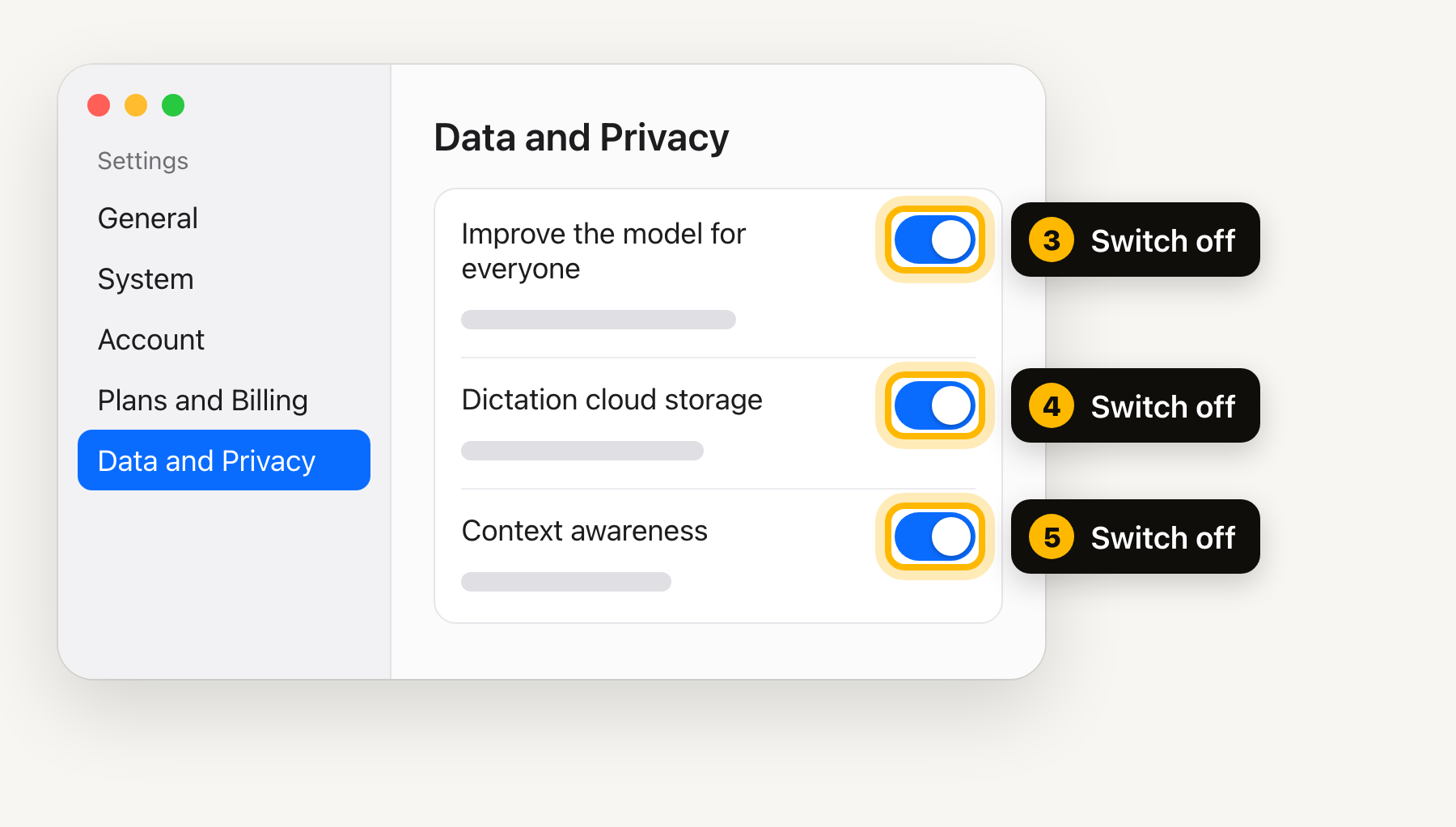
Each change saves straight away, with no message to confirm it.
How do I delete my Wispr Flow history?
You can clear it every 24 hours, stop Wispr Flow keeping it, or delete one transcript at a time.
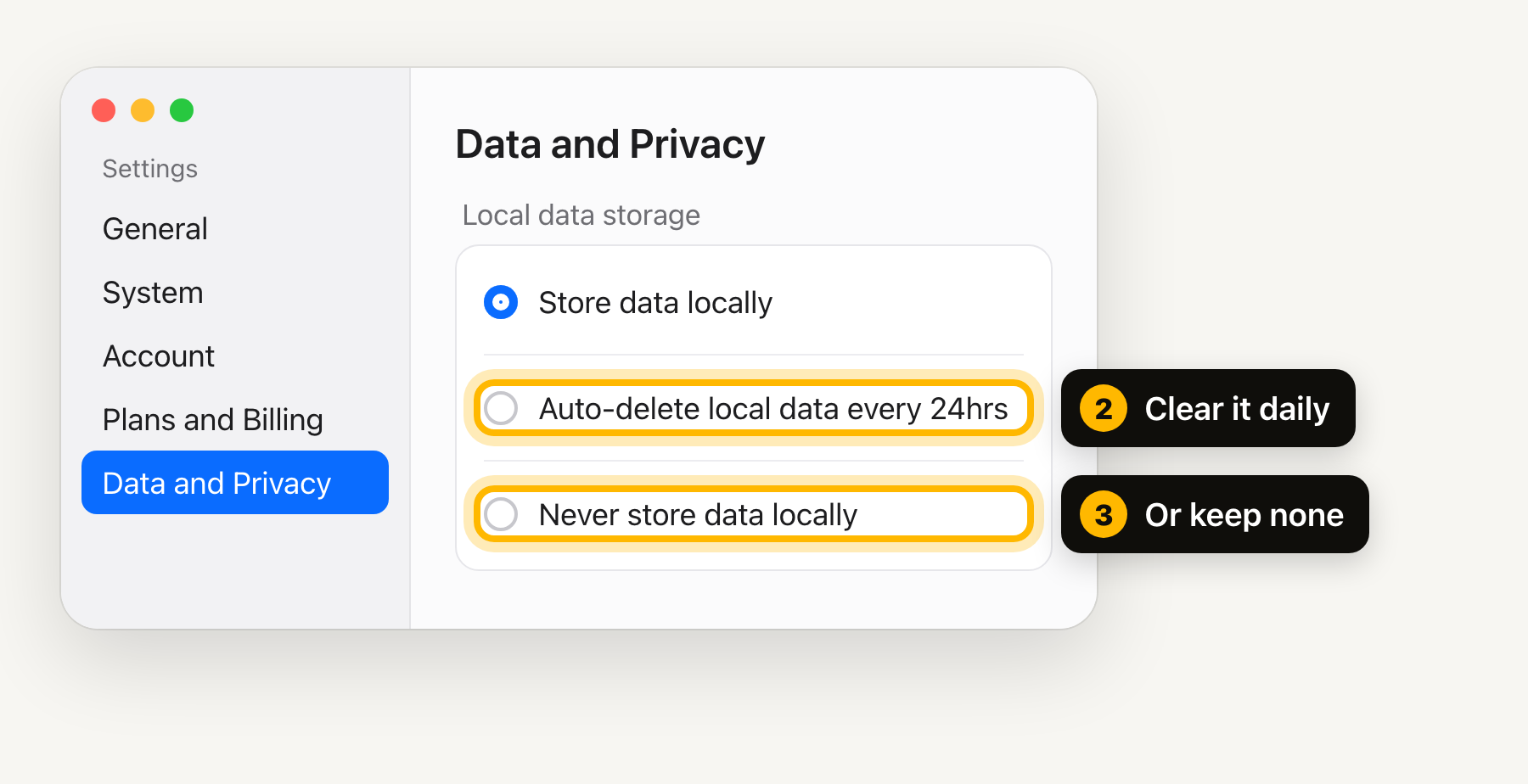
- Open Settings, then Data and Privacy.
- Under Local data storage, click Auto-delete local data every 24hrs, then click Enable auto-delete. Wispr Flow clears anything older than 24 hours from now on.
- Or click Never store data locally, then Delete all data. Wispr Flow clears your history and keeps no new transcripts until you choose Store data locally again.
To delete one transcript, go to the Hub home page in Wispr Flow, hold the pointer over the transcript, click More options (the three dots), click Delete transcript, then Yes, delete it.
Is Wispr Flow safe to use?
Wispr Flow publishes the usual security certificates. Wispr Flow states SOC 2 Type II, HIPAA and ISO 27001 compliance. Wispr's SOC 2 Type II report and ISO 27001 certificate cover dictation. Its help pages say the meeting Notetaker was not assessed in the SOC 2 report.
Being safe from hackers is a different question from being private. A certificate says Wispr protects what it keeps. The switches above decide how much it keeps in the first place.
What are the privacy issues with Wispr Flow?
The privacy issues people raise come from Wispr's own defaults and changes:
- All three switches start on: training, cloud storage and Context awareness.
- Wispr's answer on screenshots changed between June and November 2026.
- Privacy Mode changed meaning in June 2026. It now covers training only, and a new account starts with cloud storage on.
- The history on your Mac has no lock, as one user on Reddit pointed out, calling it "a huge privacy risk". The only automatic clean-up is every 24 hours.
- Clearing the history on your Mac does not clear what is already in Wispr's cloud.
- Notetaker meeting transcripts stay in Wispr's cloud with no way to opt out.
Is Wispr Flow safe for lawyers and health data?
Only on the right plan, with the switches off. Wispr Flow's Free and Pro plans are not HIPAA-ready. A business associate agreement is available only on the Growth and Enterprise plans, signed by an admin, and it locks model training and dictation cloud storage off.
If you are a doctor, a therapist or anyone else who dictates patient details, a personal Pro plan is the wrong plan. Ask your practice to set up Growth or Enterprise with the agreement signed before anyone dictates patient details.
If you are a lawyer, your duty to keep client information confidential applies to the apps you dictate into. Check that training and Dictation cloud storage are off, keep Context awareness off when a client file is on screen, and ask your firm whether its Wispr plan comes with a signed data agreement. Our guide on whether dictation software is confidential for lawyers has the questions to ask any vendor.
Where does Roar fit?
We built Roar, a dictation app for Mac. Roar also turns your speech into text in the cloud, so here is what our privacy policy says about the same questions, in its own words.
- Your audio. Roar does not store your audio. The policy says: "Our server never writes it to storage, and neither does the speech-recognition service, before or after your transcript is produced."
- Training. Roar does not use your dictations to train models.
- Your history. "Your notes and your full dictation history are stored only in a local database on your own computer. They are never uploaded, synced, or copied to our servers."
- What Roar reads. To pick a style, "Roar can look at which app you are typing into and which site a browser is showing." "It reads the site name only (for example mail.google.com), never the rest of the address, never the page's contents, and never a window title." And "What reaches our servers is the name of the style you ended up with, never the app and never the site." Site-matching is on when you install Roar. You can switch app-matching and site-matching off in Settings, Dictation, Style.
- Proofreading. The text, never the audio, can go to an AI service to tidy it up, on "a paid service tier that does not train on your content." You can switch it off in Settings, Dictation, Accuracy.
- What Roar keeps on its servers. Your email address, a hashed password, and counts of your words, characters, minutes and dictations.
Roar is not the right app for everyone who asks this question. Our policy says "Roar is not built or sold for handling patient records." If you need a signed health data agreement, Wispr Flow's Growth and Enterprise plans offer one. Roar needs Apple silicon (M1 or newer). Roar has no iPhone app.
Choose Wispr Flow if you need it on Windows or your phone, or a signed health data agreement. Choose Roar if you write on a Mac and want no copy of your audio or your history on anyone's server. Roar costs $12 a month, $30 a quarter, or $96 a year, which is $8 a month. Your first 5 dictations are free, with no card. There is no free plan after that. You can download Roar for Mac.